GRADUATE GAME DESIGNER
First Class With Honours
NEON CITY DEVELOPMENT
This Dev Blog will be focusing on my project "Neon City". I intend to update it regularly, highlighting the progress of the project as well as my workflow and everything else that comes with making a game!


ENTRY 1:
Initially this project started out as just "Neon", but in all honesty I wasn't entirely happy with it. My initial concept for it was a platformer set in a world of basic geometry and well... Neon. It had standard platforming elements such as moving platforms, running, jumping, rotating surfaces and the such; but even though I stuck with it I felt it wasn't as good as it could be, nor did it showcase me in my best light.
So I spent a bit of time away from the project all together, working on other things and continuing to learn and improve. Then this idea started to form in the back of my mind, keeping the core essence of what I wanted to do initially but just... better I guess. The main problem I had with "Neon" was that it was just too boring and slapdash if I am being brutally honest, which is what this Dev Blog is partly about!
I wanted to make this platformer whereby it really gave a sense of being high up, standing precariously on the edge of walkways or hanging above the abyss and so I thought about changing the setting to one where that sort of environment is easily believable. A city! But not just any city... oh no, a futuristic city! One where the idea of jumping from floating platform to floating platform wouldn't seem so out of place so long as the things around it grounded it firmly in reality (me being a firm believer in Scott Rogers "Triangle of Weirdness").
This is where I started to research futuristic city concepts and references, focusing on ideas such as BladeRunner, Ghost In The Shell and Star Wars' city of Coruscant. I thought a grimy and dark city would showcase the glowing signs and billboards I wanted to include.
Having the city as my playground I could utilise that difference in Height much better, starting from street level I could have the Player scaling and jumping over rooftops and skyscrapers before bringing them back down again.
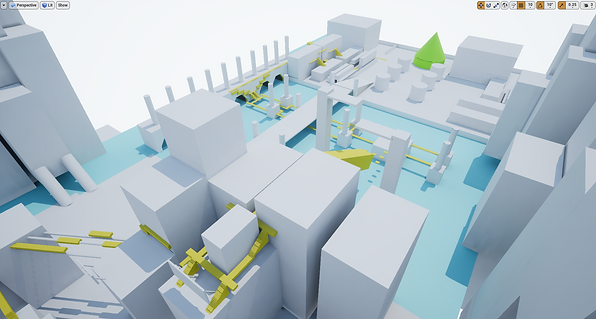
It also gave me a great idea for what the Player would see around them, with the idea being at street level it would be claustrophobic and then the higher up you went the more you saw this sprawling Metropolis. Having this idea of where the Player would be and what they would see made creating the "Player's Golden Path" so much easier.
Having the route meant I could test what was feasible often, seeing what worked and what didn't as well as noting places "off the beaten track" I could use should I choose to hide things. It also allowed me to think of where best I could place my Mechanics I had Blueprinted in the near future.
Now that I have the initial Whitebox of the city made and the Player's Golden Path mapped out I can start to add mechanics for that extra challenge, as well as test what works and most importantly see if it is FUN to play!
ENTRY 2: 26/03/18
This post focuses mainly on my efforts to get one of the enemies up and running (well... definitely running). Thanks to the awesome people at Epic for releasing the Paragon assets for personal use!
Whilst I was creating the level flow for my game I thought about having these open stage areas that would be great for combat. Initially I didn't feel that I wanted this game to have combat but the more I mulled it over the more I thought it would make the game more fun, more challenging and more diverse in terms of getting the Player to do different things. Regarding the pacing I felt it would ramp it up a notch or two and hopefully giving the Player a sense of urgency and danger. It also (hopefully) allows them to concoct their own narrative as to who they are and why they are doing what it is they are doing.
First things first I had to get the animation states all set up and making sense.
The idle and running states and animations were simple enough to set up but when I first had the attack sequence kick off I was doing it by playing one animation, then delaying and then playing the second. Now admittedly animations/states/rigging and that sort of thing is one of my weak areas. I haven't done a lot of it and so I have had to do a lot of learning on the fly, which I'm enjoying (incase you were wondering). That being said I created and used an animation montage that blends the two attack animations together, making it so much better.
The Minion (I know, super creative and unique naming conventions) uses PawnSensing to track and follow the Player. At the start I just had the Minion follow the Player forever, but I have since put in a distance that measures them both and stops the Minion if the Player is so far away. I've also done the same for the attack function, should the Player be too close then they get a nice swipe of the dual swords.
I have since refined these states to be a lot more fluid and to work a lot better because what the animation looked like beforehand was akin to me trying to dance after a few too many whiskies. I wasn't happy with it, at all. So utilising the Do Once node and expanding upon the logic within the blueprints I have something that looks a lot more polished. I think there are still a couple of tweaks and improvements to be made, but I'm pretty certain 90% of the Minion is there.
I've included a video of the most recent animations and the state of the Minion enemy, so judge for yourself and thanks for taking the time out to read this!
ENTRY 3: 6/4/18
I have spent the last few days really focusing on my beat chart and making sure I am happy with the progression of the Player, the amount of new mechanics introduced in each area and the challenges that are ramped up. Of course the proof is in the pudding and I can always change things if I feel something isn't working or someone else mentions it on playthrough feedback but I am really happy with what I have designed so far ( I will include a version of the beat chart once the project is edging towards completion).
I have also started adding models to my game, although I have yet to texture them in Substance (having to do things in stages like this because of my Potato PC not being able to handle Unreal and Substance without throwing a fit and breaking on me). I suppose this way I can get the models in and placed quicker and adjust as necessary without spending hours tweaking and amending things I've already spent a vast amount of time on texturing.
But yeah, here is a snippet of some of the models I have made the past few days:
ENTRY 4: 30/4/18
It has been a little while since I last updated this blog. That has been intended and not me being lazy or forgetting (I swear!). The reason as to why I haven't updated for a while is that I wanted to ensure I had enough work to actually warrant being classed as an update. With that said, let's crack on!
Previously I had only managed to get the spawn section of the level made and I had just started getting a more detailed (but still basic) layout down. WELL!That's been ramped up a fair bit. Not only have I got that area much more heavily populated with meshes but it also looks close to where I want it to be in terms of finished, done, finito.
Now as a rule of thumb I don't normally do a lot of texturing, particle placement, lighting and stuff until the project is 90% complete because if a level/section needs a major overhaul then it is a much simpler task to replace simple whitebox assets then it is to remove or change completed models. In this case though I have extensively played and tested the opening area, so I was pretty happy with making it look and feel more like the finished thing. Any tweaking can be done with minimal effort at this point.
Now would also be a good time to say about the sort of documentation I have written up for this project. I've created a Beat Chart for this level (which I will include a copy of later on) and this basically breaks down the level into smaller bitesize sections that are easier to focus on. I've included the type of mechanics, sounds, enemies/hazards, mood and other things in each of these sections as a point of reference. Now this isn't a blueprint that has to be strictly adhered to throughout development but it does give me a great point of reference and gets my ideas out of my bonce and down somewhere so that I can adapt and improve them.
I have also broken down some specific moments that I want to happen within this level, so I have expertly drawn, in painstaking attention to detail the general idea of how i want these level motif's to work.
Okay, they are stickmen and simple shapes... but hopefully you get the general gist of what they are portraying.
So yeah, back to the opening area. I don't have any spoken narrative or subtitles but I do want to get some exposition across about the world the Player finds themselves in. This takes form in the graffiti the Player comes across, the holograms and an object which is pretty hard to miss but conveys the general mood.
I don't want to bludgeon the Player round the head with obvious exposition and theme of the game, but I did want them to easily pick up on the atmosphere and the whole point of 'being' there. Which leads me onto the next part about Player signalling. During university I read several books about using the environment to guide the Player through an area or to give them enough of the carrot without bashing them with the stick as it were. Which I have hopefully done here. I've made an active decision to make assets that are linked to the Player character(PC) in some way, in this case they are green just like the PC. I've designed the opening area to be a kind of tutorial, without it being a tutorial. I just want the Player to be able to get used to the controls and the general mechanics that will be available throughout and so I have helped out with the "Golden Path" a little by using green lights to guide the way. This will hopefully teach the Player that the world isn't just a flat plane and also require little to no metaphorical hand holding throughout the rest of the level.
So that is the last thing I will leave you with
for now. Hope you'll agree that I have been
busy but that I have also put a lot of thought
into my decisions.
Until next time!

Final image of "Neon"